
AI agents are everywhere right now. It's hard to avoid the buzz.
Everywhere you look, you hear the pitch: after automation, your business's next step is setting up an AI agent—give it access to your tools, set it loose to make decisions, let it handle tasks by itself.
Sometimes, that's actually the right call.
A lot of the time, it isn't.
Honestly, you might not need an AI agent at all. Maybe what you really need is a more streamlined workflow, a simple bit of AI plugged into a step, or just regular old software that handles the boring, repetitive stuff.
Don't ask, "How can we use AI?" That's not the point.
Instead, start with this:
"Where would a little extra intelligence actually make things better?"
That single shift could save you months of work (and a pile of headaches).
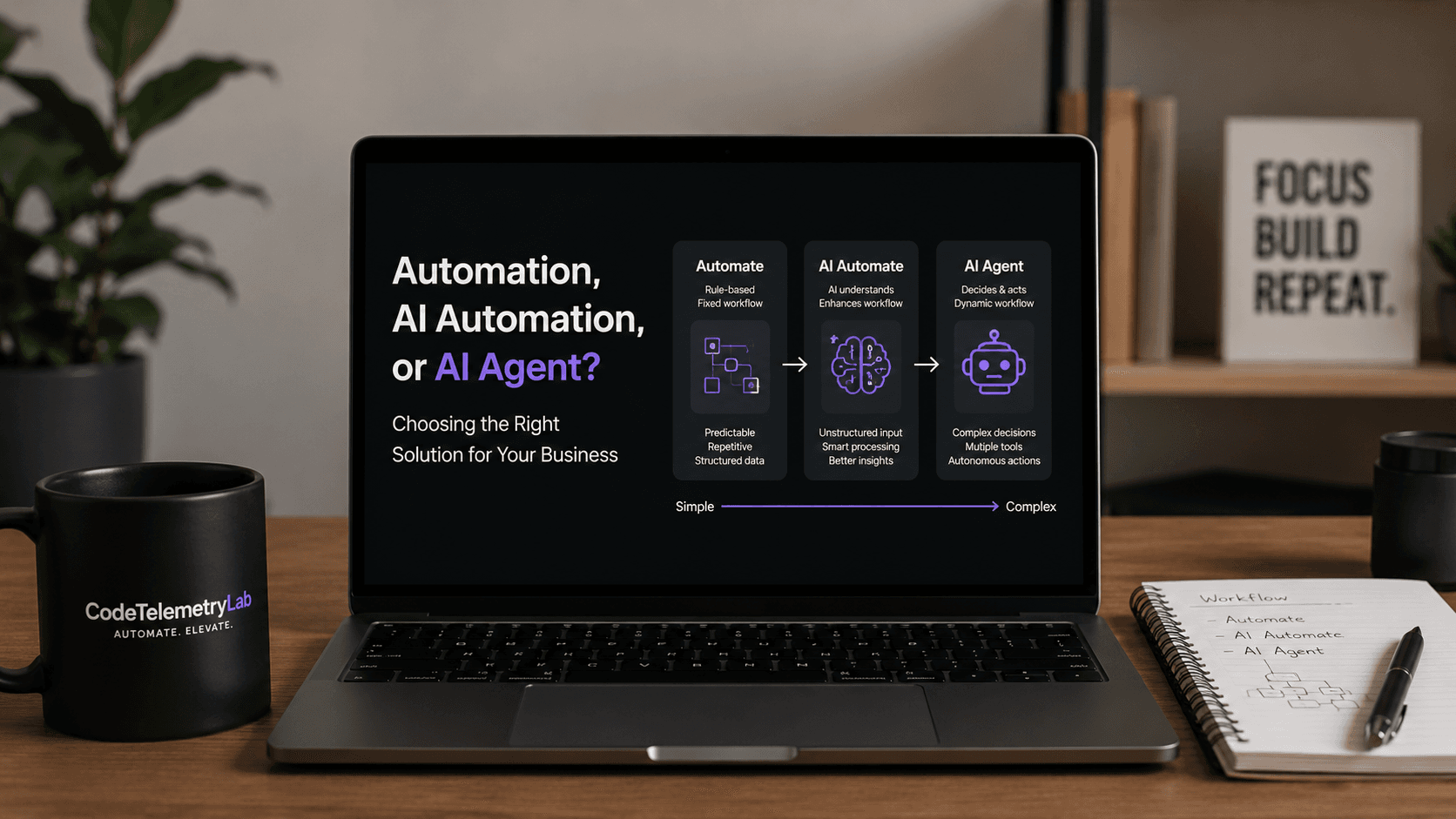
Automation, AI Automation, and AI Agents Aren't All the Same
Picture a company dealing with customer inquiries.
Here’s the classic setup:
Customer submits form
→ Create CRM record
→ Notify sales team
→ Send confirmation email
That's basic automation—just rules and scripts. No need for AI here. Everything is predictable, so logic does the trick.
Now, throw in unstructured emails, and everything changes.
Say someone writes:
"We upgraded our account last week but the dashboard still shows our old limits. Can someone check this?"
Suddenly, your automated system doesn't just need to move things along; it has to read and understand what the customer wants.
Here's where AI fits:
Customer email
→ AI understands the request
→ Pull out the issue and urgency
→ Feed into business rules
→ Create or update a ticket
→ Notify support
This is automation turbocharged by AI; the AI reads, the process stays the same.
But an AI agent? That's another leap.
Now, instead of marching down one fixed path, the system looks at each situation and decides what to do:
- Read the customer's message.
- Check their account.
- Review their past support history.
- Investigate the billing system.
- Figure out the likely problem.
- Prepare a response.
- Escalate if things are hairy.
Now you’re seeing the beginning of a true AI agent.
When Should You Stick with Traditional Automation?
Old-fashioned automation is still ridiculously powerful. Use it when:
- The steps don't change.
- The data is structured.
- The rules are obvious.
- The same things happen over and over.
- You can lay out each choice as a formula or flowchart.
- You need rock-solid, predictable results.
Like:
IF payment_status = "paid"
THEN update_order = "processing"
No need to drag in a giant language model. The database already knows what to do.
Smart engineering isn't shoving AI into everything. It's finding—and sticking with—the simplest fix that works.
Where Does AI Actually Help?
AI shines when you run into stuff that's messy or tricky to automate with just rules.
You see this all the time:
- Customer emails
- Support tickets
- Contracts and documents
- Meeting notes
- Lead qualification
- Customer feedback
- Invoice extraction
- Text classification
- Summarization
- Natural-language requests
Here's a nice shortcut:
If your team keeps reading and interpreting something before acting, there's a good chance AI can lighten the load.
But that doesn’t mean AI should take over the entire process. Usually, it’s smarter to keep things deterministic—with rules for most steps—and let AI handle the messy bit in the middle.
You get something that's easier to test, less costly, and easier for folks to trust.
When Is an AI Agent Actually the Right Call?
You need an AI agent when your process has a lot of different possible next steps and someone (or something) needs to figure out what happens next.
Think about procurement. The simple version might route every request to a manager for approval.
A more complex version might need to:
Purchase request
→ Figure out exactly what’s being bought
→ Check inventory
→ Check for approved vendors
→ Compare prices
→ Make sure everything’s within policy
→ Ask the requester for anything missing
→ Put together a recommendation
→ Request approval
→ Create the order
Every decision depends on what the agent finds. No single path fits every situation.
That’s when agents really start delivering.
You'll find the agent talking to all sorts of tools: CRM APIs, databases, internal apps, search, email, calendars, and business systems. The agent gets a goal and figures out which tools to use, and how.
The Biggest Blunder: Building an Agent Just Because It Sounds Cool
AI agents are flashy in a demo.
In the real world, they're tricky. When an agent can take actions for real, you have to think about:
- Permissions
- Authentication
- What happens if an API flakes out
- Bad decisions
- Hallucinations
- Model costs
- Rate limits
- Logging every change
- Constantly evaluating performance
- Human override and approvals
- Data privacy
- Recovery when things break
- Audit trails
Suppose your agent can update customer records.
You need answers to questions like:
- What exactly did it change?
- Why did it do that?
- What data did it use to decide?
- Which tools did it touch?
- What happened if something failed?
- Can a person undo the change?
If you can’t answer those, your agent isn’t ready to run wild.
The Hybrid Solution: Mix and Match
Too often, businesses fall into a false choice:
Is this “automation” or an “AI agent?”
But that’s not how good systems get built.
Usually, you wind up with a mix:
Customer request
→ Traditional workflow
→ AI reads the messy info
→ Business rules check it
→ Agent figures out next action
→ Human approval when it matters
→ API carries out the real-world task
→ Database logs what happened
→ Monitoring keeps track for review
Each part does what it’s best at.
Rules do the boring, predictable pieces. AI interprets and summarizes. Agents handle context and flexible decisions. People stay in the loop when there’s actual risk.
It’s way easier to keep track of things (and fix them) than just letting a big AI run the whole show.
A Quick Checklist for Deciding What You Really Need
Ask these five questions before jumping in:
-
Is the process predictable?
If yes, lean on classic automation. -
Does it have messy, unstructured info?
If yes, AI might help interpret or organize it. -
Does the system need to choose between several actions?
That’s a sign you might want an agent. -
Does it have to use lots of tools?
If the answer is yes—CRM, databases, emails, and APIs are all involved—agentic design is worth a look. -
What if it gets something wrong?
Don’t skip this. When mistakes just create a draft email, it’s usually okay. If they touch financials or customer data, you need real safeguards.
Don’t Automate a Broken Workflow
Here’s a common trap: slapping AI (or any automation) onto a bad process.
If half your team spends all day checking the same data because nobody knows which record is right—automating that just creates a faster mess.
First, map your workflow:
- What actually kicks off the process?
- What info comes in?
- Where are the repetitive steps?
- Where do people have to make judgment calls?
- Which systems are touching the data?
- Where do mistakes usually happen?
- Who needs to approve what?
- And finally—what does “done” really mean?
Fix the messy stuff before you automate.
Start Small—Don’t Bite Off Everything at Once
Great AI setups grow step by step.
- Map out what the process looks like right now.
- Cut pointless steps that don’t add value.
- Automate the routine, repetitive bits with normal software.
- Layer in AI where humans currently spend time interpreting.
- Only add agent-like autonomy when you really need it.
- Add monitoring and controls as you go—track mistakes, costs, failures, and when people step in.
- And absolutely measure what you get back—time saved, mistake rates, speed, costs, how often humans intervene, customer response times, revenue, and other core metrics.
Success isn’t about having the shiniest AI model—it’s about making the real-world process better.
The Real Goal Isn't Autonomy
People love to talk about “fully autonomous” systems.
But for most companies, that's not actually the goal.
Usually, it’s something way simpler:
- Less manual grunt work.
- Fewer mistakes.
- Faster decisions.
- Happier customers.
- Lower ops costs.
- More scale without growing the payroll.
Sometimes, a smart AI agent is the answer. Other times, a 200-line backend script does the trick. Often, the best system mixes several approaches.
Your tools should fit the business need. Not the other way around.
Bottom Line
Before you ask, “Should we use an AI agent?” step back and ask a smarter question:
Where does adding intelligence actually make a measurable improvement?
Stick with automation for the routine. Use AI for reading and understanding messy info. Call in agents if you truly need to reason through complex actions and use multiple tools. Keep humans involved when the stakes are high.
The best AI system isn’t the most autonomous—it’s the one that works, day in and day out, making life easier without creating bigger engineering headaches.
Thinking about automating a workflow?
CodeTelemetryLab helps businesses turn manual work into working software systems—basic automation, AI in the right spots, and production-ready agents when you actually need them.
If you already know where the pain is, look at your workflow first—not the technology.
Tell us what happens now, where your team wastes the most time, and what you're hoping to fix.