
AI coding tools have made it possible to turn an idea into a surprisingly polished website in hours. But a polished interface is only the beginning. Here is what needs to happen before that prototype can safely become a real product.
The prototype looks finished. That is the problem.
You describe an idea to an AI coding tool.
A few prompts later, you have:
-
A polished landing page
-
A dashboard
-
Login and signup screens
-
Navigation
-
Forms
-
Tables
-
Charts
-
Responsive layouts
-
Maybe even an admin panel
You deploy it.
The URL works.
You can click around.
It looks like a real SaaS product.
And that is where an important distinction gets missed.
A website that looks like a product is not necessarily a product.
Modern AI coding tools have dramatically reduced the cost and time required to create software prototypes. That is genuinely useful. A founder can now validate an idea without spending weeks building every screen from scratch.
But the distance between:
"I can demonstrate this."
and
"Real customers can safely depend on this."
is still significant.
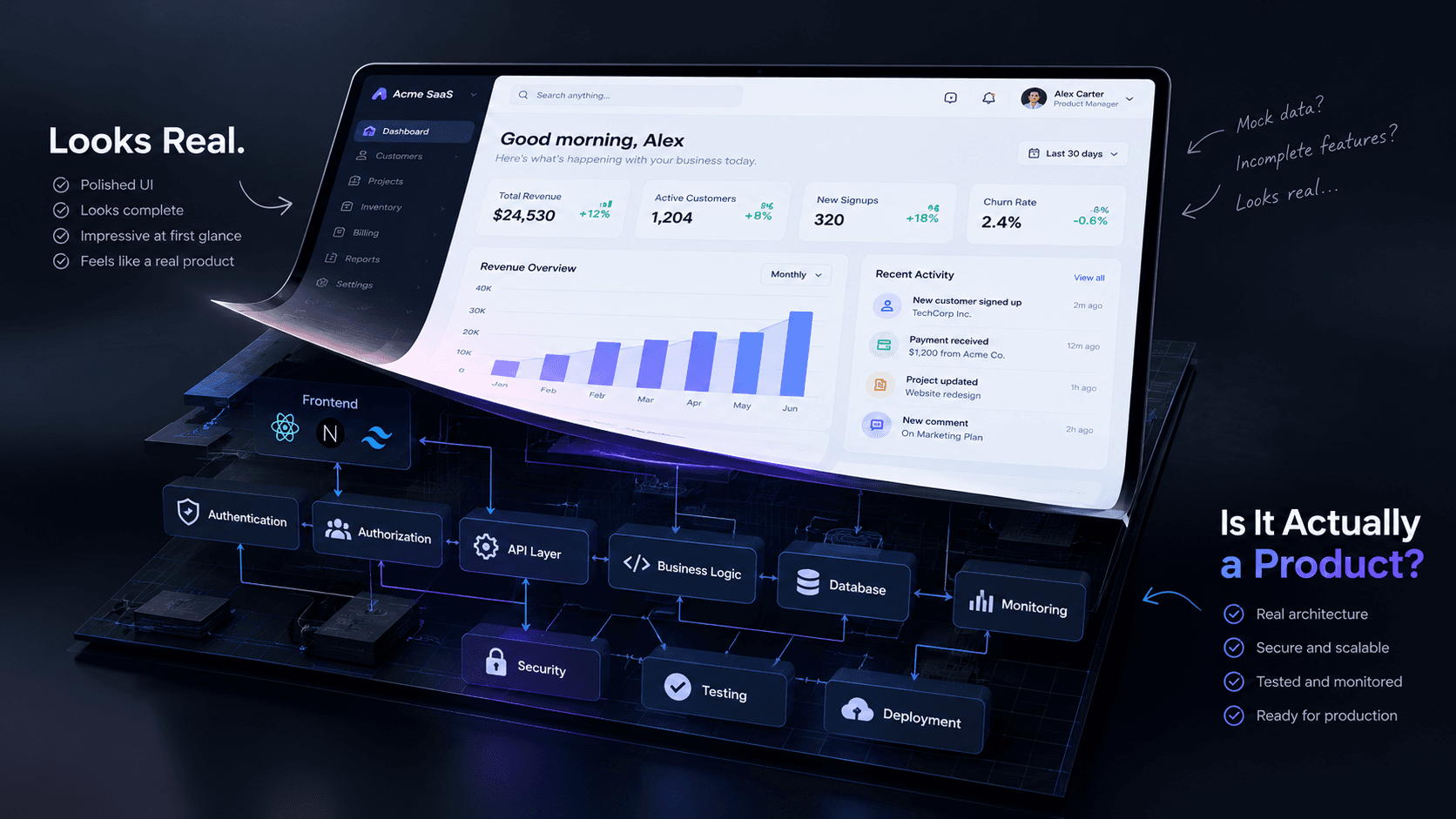
The interface is only one layer of the system.
Behind that interface you need authentication, authorization, data integrity, APIs, database design, security, error handling, observability, deployment processes, backups and a system that behaves correctly when users do things you did not anticipate.
This article explains how to make that transition.
1. First, understand what you actually built
Before fixing anything, determine what your AI-generated application really contains.
There are usually three different states.
State 1: Visual prototype
The application primarily demonstrates an interface.
You might have:
Plain textANTLR4BashCC#CSSCoffeeScriptCMakeDartDjangoDockerEJSErlangGitGoGraphQLGroovyHTMLJavaJavaScriptJSONJSXKotlinLaTeXLessLuaMakefileMarkdownMATLABMarkupObjective-CPerlPHPPowerShell.propertiesProtocol BuffersPythonRRubySass (Sass)Sass (Scss)SchemeSQLShellSwiftSVGTSXTypeScriptWebAssemblyYAMLXML Dashboard ↓ Hardcoded statistics ↓ Mock table data ↓ Buttons with limited functionality
It looks convincing but does not represent a complete system.
State 2: Functional prototype
Now some parts actually work.
For example:
Plain textANTLR4BashCC#CSSCoffeeScriptCMakeDartDjangoDockerEJSErlangGitGoGraphQLGroovyHTMLJavaJavaScriptJSONJSXKotlinLaTeXLessLuaMakefileMarkdownMATLABMarkupObjective-CPerlPHPPowerShell.propertiesProtocol BuffersPythonRRubySass (Sass)Sass (Scss)SchemeSQLShellSwiftSVGTSXTypeScriptWebAssemblyYAMLXML Frontend ↓ API ↓ Database
Users can create records, update them and retrieve data.
This is much more useful, but it may still lack production-level security, reliability and operational controls.
State 3: Production-ready application
A production system needs to handle:
Plain textANTLR4BashCC#CSSCoffeeScriptCMakeDartDjangoDockerEJSErlangGitGoGraphQLGroovyHTMLJavaJavaScriptJSONJSXKotlinLaTeXLessLuaMakefileMarkdownMATLABMarkupObjective-CPerlPHPPowerShell.propertiesProtocol BuffersPythonRRubySass (Sass)Sass (Scss)SchemeSQLShellSwiftSVGTSXTypeScriptWebAssemblyYAMLXML User ↓ Authentication ↓ Authorization ↓ Frontend ↓ API / Server ↓ Validation ↓ Business Logic ↓ Database ↓ Logging / Monitoring
And the system needs to behave correctly when something goes wrong.
That distinction should drive the rest of the engineering work.
2. Stop trusting the UI
One of the easiest mistakes in an AI-generated application is assuming that a visible interface represents actual security.
Imagine you have an admin dashboard.
The UI hides the "Delete User" button from normal users.
That does not mean normal users are prevented from deleting users.
If the backend accepts:
Plain textANTLR4BashCC#CSSCoffeeScriptCMakeDartDjangoDockerEJSErlangGitGoGraphQLGroovyHTMLJavaJavaScriptJSONJSXKotlinLaTeXLessLuaMakefileMarkdownMATLABMarkupObjective-CPerlPHPPowerShell.propertiesProtocol BuffersPythonRRubySass (Sass)Sass (Scss)SchemeSQLShellSwiftSVGTSXTypeScriptWebAssemblyYAMLXML DELETE /api/users/123
without checking authorization, someone can potentially call that endpoint directly.
The frontend is not your security boundary.
The server is.
A better architecture looks like:
Plain textANTLR4BashCC#CSSCoffeeScriptCMakeDartDjangoDockerEJSErlangGitGoGraphQLGroovyHTMLJavaJavaScriptJSONJSXKotlinLaTeXLessLuaMakefileMarkdownMATLABMarkupObjective-CPerlPHPPowerShell.propertiesProtocol BuffersPythonRRubySass (Sass)Sass (Scss)SchemeSQLShellSwiftSVGTSXTypeScriptWebAssemblyYAMLXML Browser | | Request ↓ Authentication | ↓ Authorization | ↓ Input Validation | ↓ Business Logic | ↓ Database
Every sensitive operation needs server-side enforcement.
3. Replace fake authentication with real authentication
A prototype often contains something that looks like authentication.
For example:
Plain textANTLR4BashCC#CSSCoffeeScriptCMakeDartDjangoDockerEJSErlangGitGoGraphQLGroovyHTMLJavaJavaScriptJSONJSXKotlinLaTeXLessLuaMakefileMarkdownMATLABMarkupObjective-CPerlPHPPowerShell.propertiesProtocol BuffersPythonRRubySass (Sass)Sass (Scss)SchemeSQLShellSwiftSVGTSXTypeScriptWebAssemblyYAMLXML const isLoggedIn = true;
Or:
Plain textANTLR4BashCC#CSSCoffeeScriptCMakeDartDjangoDockerEJSErlangGitGoGraphQLGroovyHTMLJavaJavaScriptJSONJSXKotlinLaTeXLessLuaMakefileMarkdownMATLABMarkupObjective-CPerlPHPPowerShell.propertiesProtocol BuffersPythonRRubySass (Sass)Sass (Scss)SchemeSQLShellSwiftSVGTSXTypeScriptWebAssemblyYAMLXML localStorage.setItem("user", JSON.stringify(user));
That can be acceptable for demonstrating a concept.
It is not a production authentication system.
A real authentication flow needs to answer several questions:
-
Who is the user?
-
How is their identity verified?
-
Where is the session stored?
-
How long does the session remain valid?
-
How can the user log out?
-
What happens if the session expires?
-
How does password recovery work?
-
How is email ownership verified?
-
How are credentials protected?
-
What happens when someone repeatedly attempts to log in?
A typical flow might look like:
Plain textANTLR4BashCC#CSSCoffeeScriptCMakeDartDjangoDockerEJSErlangGitGoGraphQLGroovyHTMLJavaJavaScriptJSONJSXKotlinLaTeXLessLuaMakefileMarkdownMATLABMarkupObjective-CPerlPHPPowerShell.propertiesProtocol BuffersPythonRRubySass (Sass)Sass (Scss)SchemeSQLShellSwiftSVGTSXTypeScriptWebAssemblyYAMLXML User ↓ Login Form ↓ POST /api/auth/login ↓ Validate Input ↓ Verify Credentials ↓ Create Session ↓ Secure Cookie ↓ Authenticated Request ↓ Protected Resource
The exact implementation depends on your architecture, but the principle remains the same:
Authentication should be implemented as a real system, not simulated by the interface.
4. Authentication is not authorization
These two concepts are often mixed together.
They are different.
Authentication
Answers:
Who are you?
Authorization
Answers:
What are you allowed to do?
Consider a SaaS application with three users:
Plain textANTLR4BashCC#CSSCoffeeScriptCMakeDartDjangoDockerEJSErlangGitGoGraphQLGroovyHTMLJavaJavaScriptJSONJSXKotlinLaTeXLessLuaMakefileMarkdownMATLABMarkupObjective-CPerlPHPPowerShell.propertiesProtocol BuffersPythonRRubySass (Sass)Sass (Scss)SchemeSQLShellSwiftSVGTSXTypeScriptWebAssemblyYAMLXML Owner Admin Employee
All three may successfully log in.
But their permissions should differ.
For example:
ActionOwnerAdminEmployeeView dashboard✓✓✓Create employee✓✓✕Delete employee✓Maybe✕Manage billing✓✕✕Manage organization✓✕✕
The permission system should exist on the server.
Hiding a button in React does not create authorization.
5. Connect the application to real data
Another common characteristic of AI-generated prototypes is impressive fake data.
The dashboard may display:
Plain textANTLR4BashCC#CSSCoffeeScriptCMakeDartDjangoDockerEJSErlangGitGoGraphQLGroovyHTMLJavaJavaScriptJSONJSXKotlinLaTeXLessLuaMakefileMarkdownMATLABMarkupObjective-CPerlPHPPowerShell.propertiesProtocol BuffersPythonRRubySass (Sass)Sass (Scss)SchemeSQLShellSwiftSVGTSXTypeScriptWebAssemblyYAMLXML Revenue: $84,240 Customers: 1,284 Orders: 3,921 Growth: +24.8%
The numbers look convincing.
But where did they come from?
If the answer is:
Plain textANTLR4BashCC#CSSCoffeeScriptCMakeDartDjangoDockerEJSErlangGitGoGraphQLGroovyHTMLJavaJavaScriptJSONJSXKotlinLaTeXLessLuaMakefileMarkdownMATLABMarkupObjective-CPerlPHPPowerShell.propertiesProtocol BuffersPythonRRubySass (Sass)Sass (Scss)SchemeSQLShellSwiftSVGTSXTypeScriptWebAssemblyYAMLXML const revenue = 84240;
you have a presentation, not a business system.
The next step is connecting the application to a real source of truth.
For example:
Plain textANTLR4BashCC#CSSCoffeeScriptCMakeDartDjangoDockerEJSErlangGitGoGraphQLGroovyHTMLJavaJavaScriptJSONJSXKotlinLaTeXLessLuaMakefileMarkdownMATLABMarkupObjective-CPerlPHPPowerShell.propertiesProtocol BuffersPythonRRubySass (Sass)Sass (Scss)SchemeSQLShellSwiftSVGTSXTypeScriptWebAssemblyYAMLXML Frontend ↓ API ↓ Business Logic ↓ Database ↓ Real Records
Instead of manually defining dashboard statistics, the application should calculate them from actual records.
That means designing:
-
Database tables
-
Relationships
-
Primary keys
-
Foreign keys
-
Indexes
-
Constraints
-
Validation rules
-
Transactions where necessary
-
Data ownership rules
The database is not simply a place to store whatever the AI generated.
It represents the underlying model of the business.
6. Review the database before adding more features
This is one of the places where moving too quickly with AI-generated code can create expensive problems.
Suppose your application has:
Plain textANTLR4BashCC#CSSCoffeeScriptCMakeDartDjangoDockerEJSErlangGitGoGraphQLGroovyHTMLJavaJavaScriptJSONJSXKotlinLaTeXLessLuaMakefileMarkdownMATLABMarkupObjective-CPerlPHPPowerShell.propertiesProtocol BuffersPythonRRubySass (Sass)Sass (Scss)SchemeSQLShellSwiftSVGTSXTypeScriptWebAssemblyYAMLXML Users Projects Tasks Organizations Subscriptions Invoices
You need to understand how these entities relate.
For example:
Plain textANTLR4BashCC#CSSCoffeeScriptCMakeDartDjangoDockerEJSErlangGitGoGraphQLGroovyHTMLJavaJavaScriptJSONJSXKotlinLaTeXLessLuaMakefileMarkdownMATLABMarkupObjective-CPerlPHPPowerShell.propertiesProtocol BuffersPythonRRubySass (Sass)Sass (Scss)SchemeSQLShellSwiftSVGTSXTypeScriptWebAssemblyYAMLXML Organization | +---- Users | +---- Projects | +---- Tasks
If the data model is wrong, adding more UI does not solve the problem.
It usually makes the problem harder to fix later.
Before expanding the application, ask:
-
What is the source of truth?
-
Who owns this record?
-
Can two organizations access the same record?
-
What happens when a user is deleted?
-
What happens when an organization is deleted?
-
Which fields are required?
-
Which values must be unique?
-
Which operations need transactions?
-
Which queries will become expensive as data grows?
These are product questions expressed through engineering.
7. Make every button mean something
A prototype can get away with buttons that do nothing.
A production application cannot.
Consider:
Plain textANTLR4BashCC#CSSCoffeeScriptCMakeDartDjangoDockerEJSErlangGitGoGraphQLGroovyHTMLJavaJavaScriptJSONJSXKotlinLaTeXLessLuaMakefileMarkdownMATLABMarkupObjective-CPerlPHPPowerShell.propertiesProtocol BuffersPythonRRubySass (Sass)Sass (Scss)SchemeSQLShellSwiftSVGTSXTypeScriptWebAssemblyYAMLXML [Create Customer]
What should happen when the user clicks it?
A complete workflow might be:
Plain textANTLR4BashCC#CSSCoffeeScriptCMakeDartDjangoDockerEJSErlangGitGoGraphQLGroovyHTMLJavaJavaScriptJSONJSXKotlinLaTeXLessLuaMakefileMarkdownMATLABMarkupObjective-CPerlPHPPowerShell.propertiesProtocol BuffersPythonRRubySass (Sass)Sass (Scss)SchemeSQLShellSwiftSVGTSXTypeScriptWebAssemblyYAMLXML Click ↓ Validate form ↓ Submit request ↓ Show loading state ↓ Server validates request ↓ Database operation ↓ Return response ↓ Update UI ↓ Show success state
And what happens if the database fails?
The user should not see a broken interface.
They should receive meaningful feedback.
For example:
"We couldn't create the customer right now. Please try again."
The UI should account for:
-
Loading
-
Success
-
Validation errors
-
Authentication errors
-
Permission errors
-
Network failures
-
Empty states
-
Server errors
This is one of the simplest ways to distinguish a demo from an application people can actually use.
8. Validate on both sides
Client-side validation improves the user experience.
It should not be your only validation.
For example, the browser might check:
Plain textANTLR4BashCC#CSSCoffeeScriptCMakeDartDjangoDockerEJSErlangGitGoGraphQLGroovyHTMLJavaJavaScriptJSONJSXKotlinLaTeXLessLuaMakefileMarkdownMATLABMarkupObjective-CPerlPHPPowerShell.propertiesProtocol BuffersPythonRRubySass (Sass)Sass (Scss)SchemeSQLShellSwiftSVGTSXTypeScriptWebAssemblyYAMLXML Email → valid format Password → minimum length Name → required
But the server needs to validate the request again.
Why?
Because users do not have to use your interface.
They can call your API directly.
The general rule is:
Never assume the client is trustworthy.
The frontend helps users provide valid information.
The backend protects the system from invalid or unauthorized operations.
9. Protect secrets properly
AI-generated applications sometimes make configuration mistakes surprisingly easy.
You may find things such as:
Plain textANTLR4BashCC#CSSCoffeeScriptCMakeDartDjangoDockerEJSErlangGitGoGraphQLGroovyHTMLJavaJavaScriptJSONJSXKotlinLaTeXLessLuaMakefileMarkdownMATLABMarkupObjective-CPerlPHPPowerShell.propertiesProtocol BuffersPythonRRubySass (Sass)Sass (Scss)SchemeSQLShellSwiftSVGTSXTypeScriptWebAssemblyYAMLXML API keys Database credentials Service tokens Private configuration
inside client-side code or accidentally committed to a repository.
Anything sent to the browser should be treated as potentially visible to the user.
A safer architecture separates:
Plain textANTLR4BashCC#CSSCoffeeScriptCMakeDartDjangoDockerEJSErlangGitGoGraphQLGroovyHTMLJavaJavaScriptJSONJSXKotlinLaTeXLessLuaMakefileMarkdownMATLABMarkupObjective-CPerlPHPPowerShell.propertiesProtocol BuffersPythonRRubySass (Sass)Sass (Scss)SchemeSQLShellSwiftSVGTSXTypeScriptWebAssemblyYAMLXML Public configuration + Server-side secrets
For example:
Plain textANTLR4BashCC#CSSCoffeeScriptCMakeDartDjangoDockerEJSErlangGitGoGraphQLGroovyHTMLJavaJavaScriptJSONJSXKotlinLaTeXLessLuaMakefileMarkdownMATLABMarkupObjective-CPerlPHPPowerShell.propertiesProtocol BuffersPythonRRubySass (Sass)Sass (Scss)SchemeSQLShellSwiftSVGTSXTypeScriptWebAssemblyYAMLXML Browser ↓ Your API ↓ Private service
rather than:
Plain textANTLR4BashCC#CSSCoffeeScriptCMakeDartDjangoDockerEJSErlangGitGoGraphQLGroovyHTMLJavaJavaScriptJSONJSXKotlinLaTeXLessLuaMakefileMarkdownMATLABMarkupObjective-CPerlPHPPowerShell.propertiesProtocol BuffersPythonRRubySass (Sass)Sass (Scss)SchemeSQLShellSwiftSVGTSXTypeScriptWebAssemblyYAMLXML Browser ↓ Private API key ↓ External service
Environment variables help manage configuration, but they are not magic.
You still need to understand which variables are exposed to the client and which remain server-side.
10. Review API boundaries
AI can generate APIs quickly.
That does not mean the API design is automatically good.
Look at every endpoint and ask:
Who can call it?
What can they send?
What can they receive?
What happens if they send unexpected data?
What happens if they request another user's data?
What happens if they call the endpoint repeatedly?
What happens if two requests modify the same record?
For example:
Plain textANTLR4BashCC#CSSCoffeeScriptCMakeDartDjangoDockerEJSErlangGitGoGraphQLGroovyHTMLJavaJavaScriptJSONJSXKotlinLaTeXLessLuaMakefileMarkdownMATLABMarkupObjective-CPerlPHPPowerShell.propertiesProtocol BuffersPythonRRubySass (Sass)Sass (Scss)SchemeSQLShellSwiftSVGTSXTypeScriptWebAssemblyYAMLXML GET /api/orders/123
should not automatically mean:
Anyone who knows order ID 123 can see it.
The server should establish whether the authenticated user is actually allowed to access that resource.
11. Add proper error handling
A production application is not defined by how it behaves when everything works.
It is defined partly by how gracefully it behaves when something doesn't.
Consider:
Plain textANTLR4BashCC#CSSCoffeeScriptCMakeDartDjangoDockerEJSErlangGitGoGraphQLGroovyHTMLJavaJavaScriptJSONJSXKotlinLaTeXLessLuaMakefileMarkdownMATLABMarkupObjective-CPerlPHPPowerShell.propertiesProtocol BuffersPythonRRubySass (Sass)Sass (Scss)SchemeSQLShellSwiftSVGTSXTypeScriptWebAssemblyYAMLXML Database unavailable API timeout Expired session Invalid input Third-party API failure Duplicate record Insufficient permissions Network interruption
Your system should have deliberate responses for these situations.
At minimum, separate:
Plain textANTLR4BashCC#CSSCoffeeScriptCMakeDartDjangoDockerEJSErlangGitGoGraphQLGroovyHTMLJavaJavaScriptJSONJSXKotlinLaTeXLessLuaMakefileMarkdownMATLABMarkupObjective-CPerlPHPPowerShell.propertiesProtocol BuffersPythonRRubySass (Sass)Sass (Scss)SchemeSQLShellSwiftSVGTSXTypeScriptWebAssemblyYAMLXML User-facing message ↓ Technical error ↓ Server logs
The user might see:
"Something went wrong. Please try again."
Your internal logs might contain:
Plain textANTLR4BashCC#CSSCoffeeScriptCMakeDartDjangoDockerEJSErlangGitGoGraphQLGroovyHTMLJavaJavaScriptJSONJSXKotlinLaTeXLessLuaMakefileMarkdownMATLABMarkupObjective-CPerlPHPPowerShell.propertiesProtocol BuffersPythonRRubySass (Sass)Sass (Scss)SchemeSQLShellSwiftSVGTSXTypeScriptWebAssemblyYAMLXML Database connection timeout request_id: ... user_id: ... endpoint: ... timestamp: ...
Do not expose sensitive technical information simply because an exception occurred.
12. Add observability before you need it
When a prototype has five users, you can manually inspect things.
When it has hundreds or thousands, that becomes difficult.
You need to know:
-
Is the API failing?
-
Which endpoint is slow?
-
Are users receiving errors?
-
Is the database responding?
-
Are third-party services failing?
-
Did a deployment introduce a regression?
At minimum, production applications should have useful:
Logs
What happened?
Metrics
How often and how quickly is it happening?
Error tracking
Where are failures occurring?
Monitoring
Is the system healthy?
You cannot reliably operate a system you cannot observe.
13. Test the workflows, not just the components
A common mistake is testing whether a page renders.
That is useful, but insufficient.
Test the actual user journey.
For example:
Plain textANTLR4BashCC#CSSCoffeeScriptCMakeDartDjangoDockerEJSErlangGitGoGraphQLGroovyHTMLJavaJavaScriptJSONJSXKotlinLaTeXLessLuaMakefileMarkdownMATLABMarkupObjective-CPerlPHPPowerShell.propertiesProtocol BuffersPythonRRubySass (Sass)Sass (Scss)SchemeSQLShellSwiftSVGTSXTypeScriptWebAssemblyYAMLXML New user ↓ Create account ↓ Verify email ↓ Login ↓ Create workspace ↓ Invite teammate ↓ Create project ↓ Add task ↓ Logout ↓ Login again ↓ Verify data still exists
Then test failure paths:
Plain textANTLR4BashCC#CSSCoffeeScriptCMakeDartDjangoDockerEJSErlangGitGoGraphQLGroovyHTMLJavaJavaScriptJSONJSXKotlinLaTeXLessLuaMakefileMarkdownMATLABMarkupObjective-CPerlPHPPowerShell.propertiesProtocol BuffersPythonRRubySass (Sass)Sass (Scss)SchemeSQLShellSwiftSVGTSXTypeScriptWebAssemblyYAMLXML Wrong password Expired session Invalid invitation Unauthorized resource Duplicate record Network failure
The goal is not simply:
"Does the page load?"
The better question is:
"Can a real user complete the business workflow reliably?"
14. Make deployment repeatable
Another common prototype problem is:
"It works on my machine."
That is not a deployment strategy.
A production workflow should make it possible to move changes through environments predictably.
A simple structure might be:
Plain textANTLR4BashCC#CSSCoffeeScriptCMakeDartDjangoDockerEJSErlangGitGoGraphQLGroovyHTMLJavaJavaScriptJSONJSXKotlinLaTeXLessLuaMakefileMarkdownMATLABMarkupObjective-CPerlPHPPowerShell.propertiesProtocol BuffersPythonRRubySass (Sass)Sass (Scss)SchemeSQLShellSwiftSVGTSXTypeScriptWebAssemblyYAMLXML Local Development ↓ Pull Request ↓ Automated Checks ↓ Staging ↓ Production
Depending on the project, this can include:
-
Automated tests
-
Linting
-
Type checking
-
Build verification
-
Database migrations
-
Environment configuration
-
Deployment previews
-
Production deployment
-
Rollback strategy
The exact tooling is less important than having a repeatable process.
15. Do not let AI-generated code accumulate blindly
This may be the most important part.
AI can generate code faster than most teams can review it.
That creates a new engineering problem:
Code velocity can exceed understanding.
You might have hundreds or thousands of lines of generated code that technically work.
But can you explain:
-
Why the architecture is structured this way?
-
Where authentication happens?
-
Where authorization happens?
-
Where business rules live?
-
Which API owns the operation?
-
Which database tables are connected?
-
What happens during failure?
-
Where secrets are stored?
-
How the application is deployed?
-
How you would debug an incident?
If nobody can answer these questions, the application has accumulated technical uncertainty.
The solution is not to stop using AI.
The solution is to introduce engineering discipline around it.
16. A practical transformation workflow
If you already have a vibe-coded application, you do not necessarily need to throw it away and start again.
A better approach is to audit it systematically.
Phase 1: Application audit
Map:
Plain textANTLR4BashCC#CSSCoffeeScriptCMakeDartDjangoDockerEJSErlangGitGoGraphQLGroovyHTMLJavaJavaScriptJSONJSXKotlinLaTeXLessLuaMakefileMarkdownMATLABMarkupObjective-CPerlPHPPowerShell.propertiesProtocol BuffersPythonRRubySass (Sass)Sass (Scss)SchemeSQLShellSwiftSVGTSXTypeScriptWebAssemblyYAMLXML Pages Routes Components APIs Database Authentication External services Environment variables Deployment
Identify what is real and what is mocked.
Phase 2: Security audit
Review:
Plain textANTLR4BashCC#CSSCoffeeScriptCMakeDartDjangoDockerEJSErlangGitGoGraphQLGroovyHTMLJavaJavaScriptJSONJSXKotlinLaTeXLessLuaMakefileMarkdownMATLABMarkupObjective-CPerlPHPPowerShell.propertiesProtocol BuffersPythonRRubySass (Sass)Sass (Scss)SchemeSQLShellSwiftSVGTSXTypeScriptWebAssemblyYAMLXML Authentication Authorization Sessions Secrets API permissions Input validation Database access File uploads Rate limiting
Fix security boundaries before adding more features.
Phase 3: Data architecture
Document:
Plain textANTLR4BashCC#CSSCoffeeScriptCMakeDartDjangoDockerEJSErlangGitGoGraphQLGroovyHTMLJavaJavaScriptJSONJSXKotlinLaTeXLessLuaMakefileMarkdownMATLABMarkupObjective-CPerlPHPPowerShell.propertiesProtocol BuffersPythonRRubySass (Sass)Sass (Scss)SchemeSQLShellSwiftSVGTSXTypeScriptWebAssemblyYAMLXML Entities Relationships Constraints Indexes Ownership Business rules
Remove unnecessary duplication and unclear sources of truth.
Phase 4: Convert core workflows
Pick the most important user journey.
For example:
Plain textANTLR4BashCC#CSSCoffeeScriptCMakeDartDjangoDockerEJSErlangGitGoGraphQLGroovyHTMLJavaJavaScriptJSONJSXKotlinLaTeXLessLuaMakefileMarkdownMATLABMarkupObjective-CPerlPHPPowerShell.propertiesProtocol BuffersPythonRRubySass (Sass)Sass (Scss)SchemeSQLShellSwiftSVGTSXTypeScriptWebAssemblyYAMLXML Signup ↓ Onboarding ↓ Create project ↓ Invite user ↓ Complete task
Make this workflow completely real before building ten additional screens.
Phase 5: Production hardening
Add:
-
Error handling
-
Logging
-
Monitoring
-
Testing
-
Backups
-
CI/CD
-
Environment separation
-
Deployment controls
Phase 6: Real-user testing
Give the product to someone who did not build it.
Do not explain how it works.
Watch where they get stuck.
Their confusion is often more valuable than another round of AI-generated UI improvements.
17. The "production-ready" checklist
Before calling an AI-built application production-ready, ask:
Product
-
Is the core business workflow clearly defined?
-
Can a real user complete it without developer assistance?
-
Are empty and error states handled?
Authentication
-
Real signup/login?
-
Secure sessions?
-
Password recovery?
-
Email verification where required?
-
Logout/session invalidation?
Authorization
-
Server-side permission checks?
-
Role-based access where required?
-
Resource ownership checks?
Data
-
Real database?
-
Clear schema?
-
Constraints?
-
Validation?
-
Appropriate indexes?
-
Data isolation between customers/tenants?
Security
-
Secrets protected?
-
Input validated?
-
APIs protected?
-
Sensitive information excluded from responses?
-
Abuse/rate limiting considered?
Reliability
-
Error handling?
-
Logging?
-
Monitoring?
-
Backups?
-
Recovery plan?
Deployment
-
Separate environments?
-
Repeatable deployment?
-
Database migration process?
-
Rollback strategy?
Testing
-
Core workflow tested?
-
Authentication tested?
-
Authorization tested?
-
Failure paths tested?
If several answers are "no", the application may still be a prototype.
And that is completely fine.
The mistake is pretending it is something else.
18. The right way to think about vibe coding
Vibe coding is not the enemy.
In fact, it can be extremely powerful.
It changes the economics of software development by making the first version of an idea dramatically cheaper to produce.
The problem appears when teams confuse generation speed with engineering completeness.
AI is very good at helping you move from:
Plain textANTLR4BashCC#CSSCoffeeScriptCMakeDartDjangoDockerEJSErlangGitGoGraphQLGroovyHTMLJavaJavaScriptJSONJSXKotlinLaTeXLessLuaMakefileMarkdownMATLABMarkupObjective-CPerlPHPPowerShell.propertiesProtocol BuffersPythonRRubySass (Sass)Sass (Scss)SchemeSQLShellSwiftSVGTSXTypeScriptWebAssemblyYAMLXML Idea ↓ Prototype
The engineering work begins when you need to move from:
Plain textANTLR4BashCC#CSSCoffeeScriptCMakeDartDjangoDockerEJSErlangGitGoGraphQLGroovyHTMLJavaJavaScriptJSONJSXKotlinLaTeXLessLuaMakefileMarkdownMATLABMarkupObjective-CPerlPHPPowerShell.propertiesProtocol BuffersPythonRRubySass (Sass)Sass (Scss)SchemeSQLShellSwiftSVGTSXTypeScriptWebAssemblyYAMLXML Prototype ↓ Reliable system ↓ Real users ↓ Real data ↓ Real business
That second transition still requires architecture, security, testing, product thinking and operational discipline.
The goal should not be:
"How quickly can AI build my website?"
A better question is:
"How quickly can we turn the AI-generated prototype into software that deserves to be trusted?"
Conclusion
AI has made software prototyping radically faster.
A founder with an idea can now create something that looks surprisingly close to a finished SaaS application without building every component manually.
That is a major advantage.
But the polished interface is only the visible layer.
Underneath it, a real product needs:
real authentication, real authorization, real data, secure APIs, validation, error handling, testing, monitoring, deployment discipline and a clear business workflow.
You do not need to stop using AI coding tools.
You need to stop treating the first working prototype as the final engineering system.
Use AI to move faster. Use engineering to make what you built dependable.
How CodeTelemetryLab approaches this
At CodeTelemetryLab, we work across the gap between an early software idea and a system that can actually support real users.
That can mean taking an existing AI-generated prototype and:
-
Auditing the current architecture
-
Replacing mock workflows with real backend functionality
-
Implementing authentication and authorization
-
Connecting applications to production databases
-
Building APIs and integrations
-
Hardening security
-
Improving reliability
-
Setting up deployment and CI/CD
-
Turning critical workflows into maintainable software
The objective is not to rewrite everything simply because it was generated with AI.
The objective is to understand what already works, identify what does not, and engineer the missing pieces properly.
Have a prototype that looks finished but is not ready for real users?
Let's look at what is actually underneath it.
[Talk to CodeTelemetryLab →]
Frequently Asked Questions
Can an AI-generated website be production-ready?
Yes. The fact that AI generated the code does not automatically determine whether the application is production-ready. The important factors are architecture, security, testing, reliability, maintainability and how the application behaves with real users and real data.
Is vibe coding bad for software development?
No. Vibe coding can be extremely useful for prototyping and accelerating development. The problem is treating generated code as automatically production-ready without reviewing its architecture, security and business logic.
How do I know if my AI-built website is only a prototype?
Look for things such as hardcoded data, mocked APIs, fake authentication, missing authorization, non-functional buttons, missing error handling and workflows that only work under ideal conditions.
Should I rebuild my AI-generated application from scratch?
Not necessarily. An audit can determine which parts are usable and which parts need to be replaced. In many cases, the existing prototype can provide a useful starting point.
What is the difference between authentication and authorization?
Authentication determines who the user is. Authorization determines what that authenticated user is allowed to access or modify.
Can I use Supabase, Firebase or another managed backend for a production application?
Yes. Managed services can significantly accelerate development. They still need to be configured correctly, especially around authentication, authorization, database policies, secrets and data access.
How much of an AI-generated application needs to be reviewed?
There is no universal percentage. The highest-risk areas should receive particular attention: authentication, authorization, data access, payment flows, external integrations, secrets, business-critical logic and deployment configuration.